Studio product
BeautyKit
Online booking for salons and independent professionals: one template serving many salons, an installable app per salon, availability computed on the server. A live demo you can actually use.
- long-running servers
- 0
- database checks
- 863
- of machine time per new salon
- < 1 min
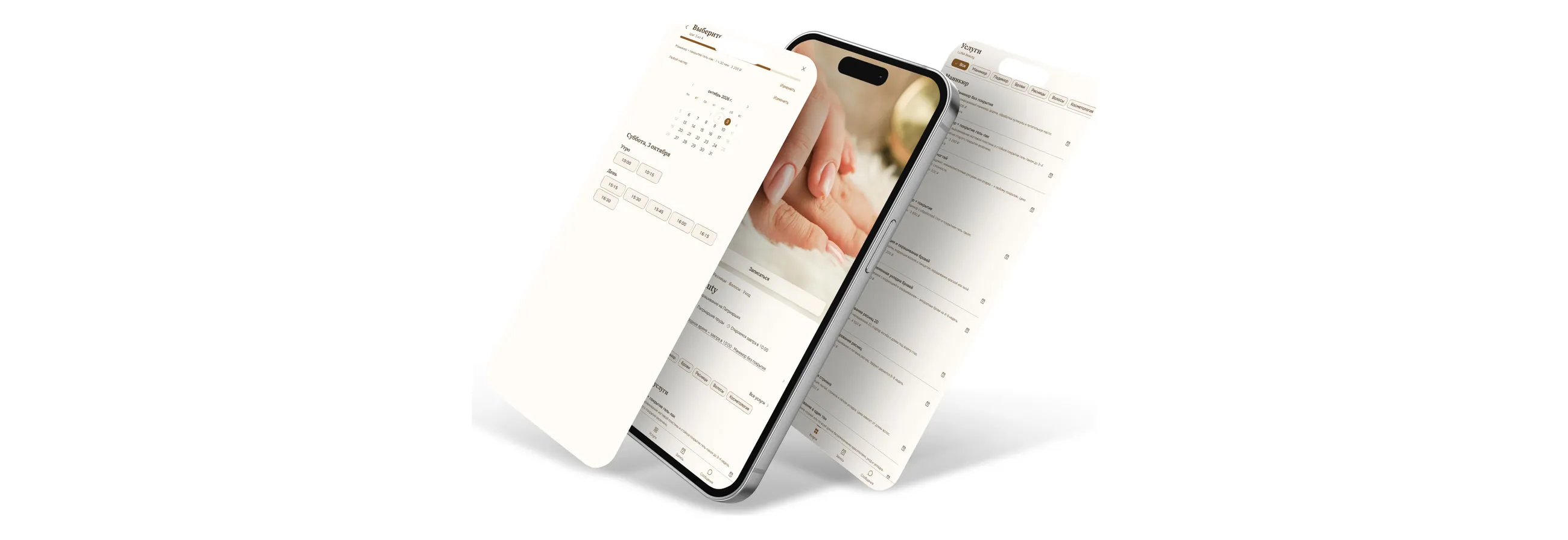
An online booking system for beauty salons, home studios and independent professionals. A client opens an ordinary link on their phone, picks a service, a specialist and a slot that is genuinely free, and books without registering. The owner runs bookings, clients, the schedule and the money from the same phone.
The interesting part is not the screens. It is that one template serves many salons: a new one is assembled from a single description file and a folder of photos, with no change to the application code and no effect on salons already running.
The “open the site” link above goes to LUNA Beauty as its clients see it. NOIR Studio runs beside it on the same code — another city, one specialist, a dark theme, and an address that only appears once a booking is confirmed.
The two links below hand you your own copy of the salon for a day, and you can change anything in it: prices, services, photos, theme. The first opens the owner cabinet straight away, with no password. The second opens the client side of that same copy: make a booking and watch it turn up in the cabinet. Everyone else keeps seeing the original salon the whole time.
Try the owner cabinet ↗Client side of your copy ↗
The salons run in demo mode: no notifications are sent anywhere, and the names and phone numbers are invented.
Double booking is prevented by the database, not by the code
Occupancy of specialists, rooms and manual blocks lives in one table with a PostgreSQL EXCLUDE constraint. Two overlapping intervals on the same resource are simply not accepted.
The obvious route is to query availability and then insert. It works right up to the moment two clients tap “book” on the last slot in the same second: both queries see it free, both insert. A check in application code cannot close that, because there is always a gap between checking and writing. A constraint in the database can, and it closes it once for every path — client booking, manual entry from the cabinet, and rescheduling.
Availability is computed on the server, not on the phone
The client receives a finished list of slots. The calculation takes in the salon’s hours and the specialist’s hours, exceptions and holidays, manual blocks, buffers before and after the procedure, occupancy of physical resources, the salon’s time zone and daylight-saving changes.
Computing that on the device is simpler and faster — and wrong. The phone does not know about a booking made a second ago by someone else, and its clock and time zone belong to the client, not to the salon. A client in another city would see someone else’s hours and book into a taken slot.
The price on a booking is a snapshot, not a reference
A booking stores the price and duration as they were when it was made. The owner raises the price of a manicure and bookings already taken do not change.
A reference to the service looks more correct in a normalised schema, but it rewrites the past: the client arrives and finds today’s price on a booking made last month. The same principle governs the money screen: the value of future bookings is never called revenue. Money appears in the report when it has been received, not when it has been promised.
A home studio’s address appears only after the booking is confirmed
A salon with a shopfront shows its address on the home page. An independent professional working from home shows a district, and the exact address arrives with the confirmation.
This is not a setting for the sake of settings: for someone working from home a public address is a safety question, not a convenience one. So the display mode belongs to the salon, and the server never returns the exact address in public data at all — it cannot be obtained by going around the interface.
Client access is a token, and only its hash is stored
There is no registration. The “my booking” link carries a cryptographically random token that opens exactly one booking and its conversation.
What the database holds is not the token but its hash: a leaked table does not hand anyone access. The token’s scope is one booking — it cannot be pointed at a neighbouring one, even if the identifier is guessed.
Each salon gets its own installable app from one build
A salon can be added to the home screen with its own name, icon and colours, while the frontend is built once for all of them.
Separate apps from a single build is its own piece of work: every salon needs its own manifest, its own icons, its own service worker scope and its own caches. Without that, installing a second salon replaces the first, and deep links open somebody else’s shell.
A demo you are allowed to break
An ordinary demo shows screens and forbids touching them, because otherwise the next visitor inherits someone else’s edits. Here the edits go into a personal copy, everyone else keeps seeing the original, and the copy is deleted automatically. It costs more than a screen recording, and it is the only way to let someone try a system whose whole point is working with data.
The assistant answers only from the salon’s own data
The client-facing assistant and the owner-facing one are different sets of server-side tools. Prices, free slots, specialists and the address are fetched by calls into the database rather than invented.
It is also stated plainly that an unavailable model must not break booking: with no keys, or with no answer, the application says honestly that the assistant is unavailable and booking carries on. In both demo salons the assistant is in fact switched off — there are no keys there, and the application says so.
What it does
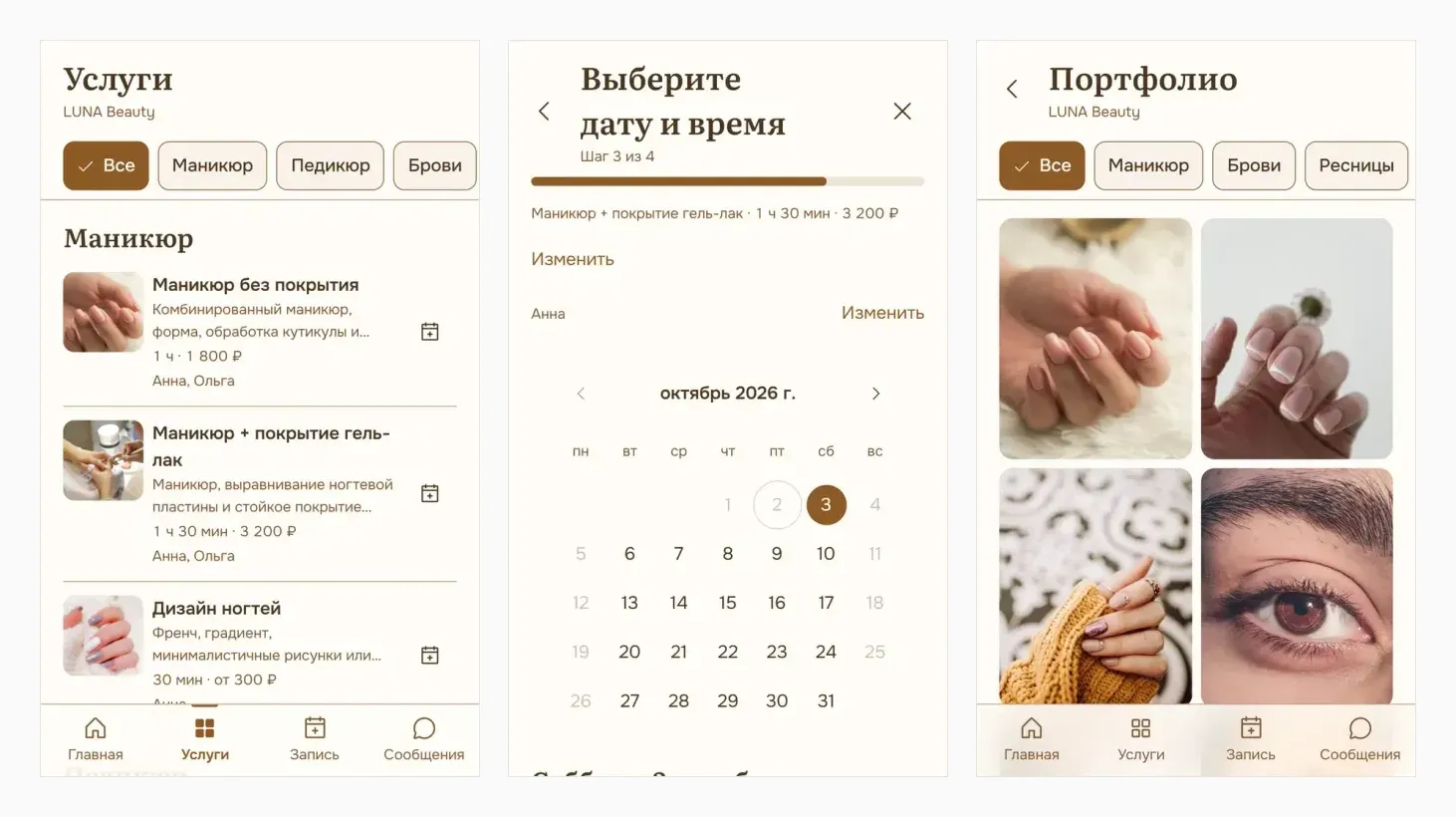
For the client, with no account. The salon home page, services with prices and durations, specialists, a portfolio with full-screen viewing, reviews, FAQ, opening hours and contacts. Booking in four steps — service, specialist, date and time, name and phone — and the specialist step is skipped when there is nothing to choose. A “my booking” page behind a protected link: rescheduling and cancellation under the salon’s own rules, an .ics file for the calendar, and a push reminder where one genuinely works. A chat with the salon carrying photos and system events such as “moved from 13:00 to 15:30”. Light and dark themes, offline with honest messages, installation as an app.
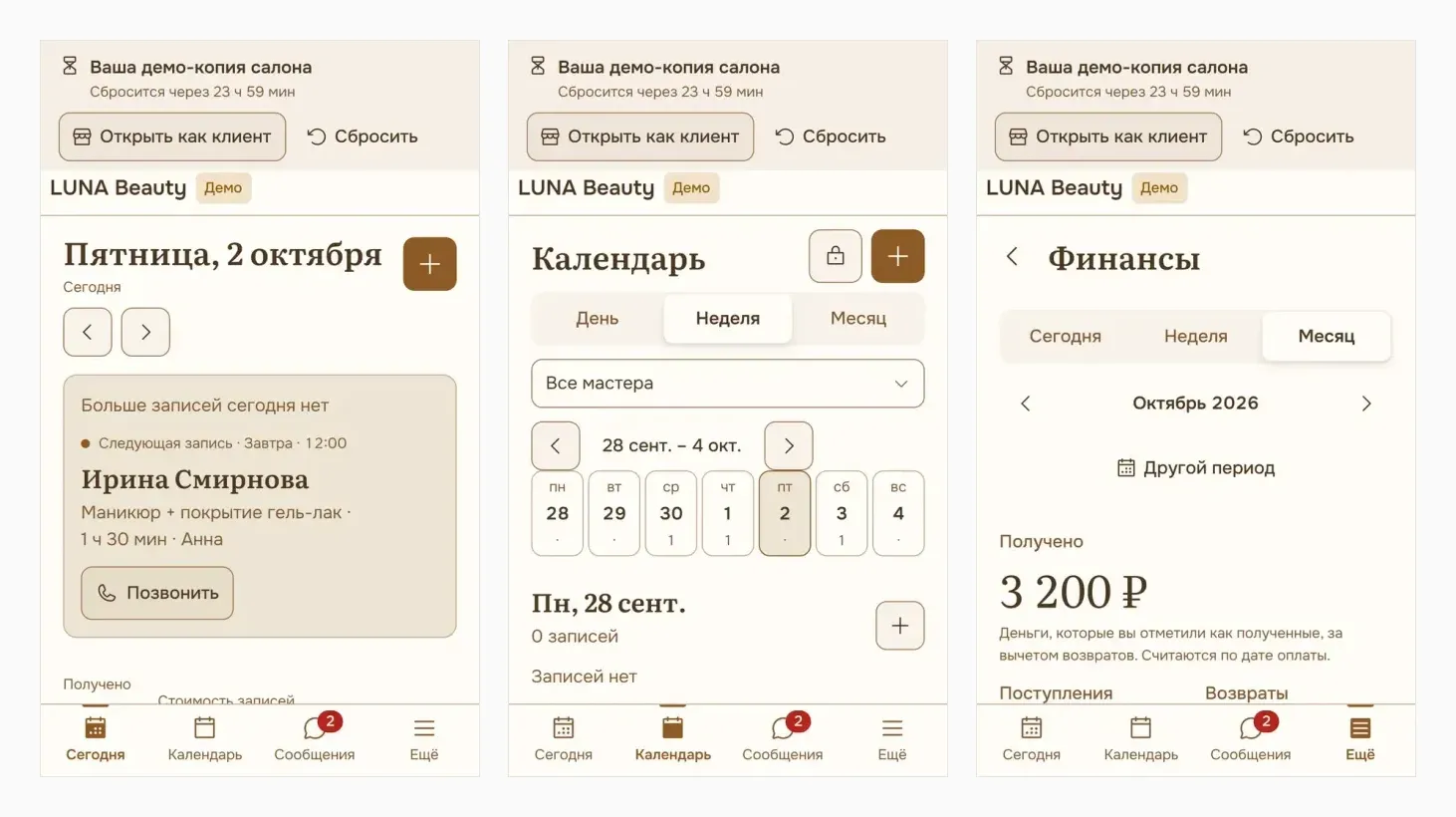
For the owner. A “today” screen with the next client, the money received that day and the schedule. A day, week and month calendar across all specialists or one, manual booking through the same conflict checks, rescheduling, visit statuses, time blocks. A client card with history, average spend, upcoming bookings and internal notes the client never sees. Services, prices, buffers, specialists, schedules, portfolio, reviews and salon settings. Money by actual payments: paid, part-paid, deposit, refund, payment methods, a chart by day. Live chat with clients, push on new bookings, and owner, administrator and staff roles.
Publishing a salon. A salon is described by one file, validated for schema, links, images and colour contrast. The publishing commands take under a minute of machine time; the content itself — names, services, photos, schedule — takes hours, and the project’s documentation says so in plain words instead of hiding behind a “salon in six minutes” promise. Re-publishing does not touch bookings, clients, payments, conversations or the owner’s own edits.
How it is built
There is no long-running Node.js server at all. Static files are served by an ordinary web server, and the server-side logic lives in SQL functions, triggers, four Edge Functions and a schedule inside the database. Fewer moving parts, and fewer places to fail quietly at night.
One database project for all salons: a tenant identifier on every table, composite foreign keys, row-level policies on each table and membership checked on the server. Public functions are open to anonymous callers and return no personal data; cabinet functions require a session and membership; maintenance functions need the service key.
Notifications go through a queue with leases, retries and de-duplication rather than being sent inside the request handler: otherwise a mail or push failure breaks the booking itself.
The server side is 48 migrations and roughly 13,000 lines of SQL; the interface is about 48,000 lines of TypeScript.
What was tested, and what was not
Database checks: 863 of 863 — concurrent booking, resources, buffers, multi-day occupancy, atomic rescheduling, idempotent retries, isolation between salons, token scope, historical pricing, payments, the notification queue, address privacy, re-publishing, sandboxes. Unit checks: 1046. End-to-end in a browser: 88, on iPhone, Android and desktop, including two clients fighting over the last slot.
Honestly, what was not tested: a call to a real language model (no keys), real push delivery to a device, installation on a physical phone, a real payment provider — payments are marked by hand in the cabinet — and email and SMS, which are not implemented.
React 19 · TypeScript · Vite · Supabase · PostgreSQL 17 · Edge Functions · PWA · Web Push · Playwright · pgTAP